The secret behind the capability of Dynamics AX to work flawlessly in different time zones is its utcDateTime data type. It combines date, TimeOfDay and time zone information into a single data type enabling the consultants to achieve date and time related requirements in a way that is more close to how we think about time in our daily lives. Like other data types in AX, utcDateTime can also be extended as required and used as the backing type of a database field.
Initialization
You can initialize a utcDateTime variable as follows.
transDateTime = utcDateTimeNull();
transDateTime = DateTimeUtil::utcNow();
transDateTime = DateTimeUtil::getSystemDateTime();
The utcNow method returns the current system time on the server without any time zone offset applied. Therefore the date/time returned by this method may not match the time you see on your machine.
The getSystemDateTime method returns the session date/time that could be set using the File > Tools > Session date and time dialog.
The newDateTime method instantiates date/time using the date, TimeOfDay and time zone parameters specified. The time zone offset when specified gets removed from the resulting date/time.
secondsElapsed = 14 * 60 * 60; // 02:00 PM
userTimeZone = DateTimeUtil::getUserPreferredTimeZone();
transDateTime = DateTimeUtil::newDateTime(today(), secondsElapsed);
transDateTime = DateTimeUtil::newDateTime(today(), secondsElapsed, userTimeZone);
Boundaries
The minimum value is 1900-01-01T00:00:00 and the maximum value is 2154-12-31T23:59:59. Note that the utcDateTimeNull function and the minvalue method return the same value.
transDateTime = DateTimeUtil::minvalue();
transDateTime = DateTimeUtil::maxvalue();
Date and time components
You can extract the date components (day, month, year) and time components (hour, minute, second) from a utcDateTime value as follows.
info(strFmt("%1", DateTimeUtil::date(transDateTime)));
info(int2str(DateTimeUtil::time(transDateTime)));
info(int2str(DateTimeUtil::day(transDateTime)));
info(int2str(DateTimeUtil::month(transDateTime)));
info(int2str(DateTimeUtil::year(transDateTime)));
info(int2str(DateTimeUtil::hour(transDateTime)));
info(int2str(DateTimeUtil::minute(transDateTime)));
info(int2str(DateTimeUtil::second(transDateTime)));
Manipulation of date and time components
You can add or subtract seconds, minutes, hours, days, months and years as follows.
transDateTime = DateTimeUtil::addSeconds(transDateTime, 60);
transDateTime = DateTimeUtil::addMinutes(transDateTime, 719);
transDateTime = DateTimeUtil::addHours(transDateTime, 36);
transDateTime = DateTimeUtil::addDays(transDateTime, 28);
transDateTime = DateTimeUtil::addMonths(transDateTime, 11);
transDateTime = DateTimeUtil::addYears(transDateTime, -1);
info(int642str(DateTimeUtil::getDifference(transDateTime, DateTimeUtil::minValue())));
The getDifference method returns the number of seconds between the two utcDateTime values specified.
Conversion
utcDateTime to str conversion can be done as follows.
dateTimeStr = DateTimeUtil::toStr(transDateTime);
dateTimeStr = DateTimeUtil::toFormattedStr(transDateTime, 231, DateDay::Digits2, DateSeparator::Hyphen, DateMonth::Short, DateSeparator::Hyphen, DateYear::Digits4, TimeSeparator::Colon, TimeSeparator::Colon, DateFlags::None);
The toStr method returns a string in the yyyy-mm-ddThh:mm:ss format, this is the format that X++ compiler recognizes.
The toFormattedStr method takes several parameters to control the formatting of date and time.
anytpe and str values can be converted to utcDateTime as follows.
transDateTime = DateTimeUtil::anyToDateTime(2015-07-03T23:45:30);
transDateTime = DateTimeUtil::parse("2015-07-04T00:00:00");
Calendar
User preferred calendar can be determined as follows.
calendar = DateTimeUtil::getUserPreferredCalendar();
info(enum2str(calendar));
Time zones
There are a several methods available in the DateTimeUtil class that can be used to work with time zones in AX. You can determine company time zone, user time zone and the client machine’s time zone.
entityTimeZone = DateTimeUtil::getCompanyTimeZone();
userTimeZone = DateTimeUtil::getUserPreferredTimeZone();
clientTimeZone = DateTimeUtil::getClientMachineTimeZone();
originTimeZone = DateTimeUtil::getOriginatingTimeZone(transDateTime);
The getOriginatingTimeZone method returns the time zone in which the specified UTC date time value was originated.
The getTimeZoneId method returns the standard time zone ID without mentioning the offset and city/country name e.g. PACIFIC STANDARD TIME.
info(DateTimeUtil::getTimeZoneId(entityTimeZone));
The getTimeZoneOffset method calculates the minute offset by subtracting time zone of the specified UTC date time (first parameter) from the specified time zone (second parameter).
info(int2str(DateTimeUtil::getTimeZoneOffset(DateTimeUtil::utcNow(), Timezone::GMTPLUS0500ISLAMABAD_KARACHI)));
The applyTimeZoneOffset method applies the specified time zone to the specified UTC date time value. This method is frequently used to apply user’s time zone to a UTC date time value previously stored.
transDateTime = DateTimeUtil::applyTimeZoneOffset(transDateTime, userTimeZone);
applyTimeZoneOffsetFilter
User preferred time zone offset can be applied to a filter as follows.
query = new Query();
dsRfqTable = query.addDataSource(tableNum(PurchRFQTable), 'Rfq');
dsRfqTable.addSelectionField(fieldNum(PurchRFQTable, RFQId));
dsRfqTable.addSelectionField(fieldNum(PurchRFQTable, VendAccount));
dsRfqLine = dsRfqTable.addDataSource(tableNum(PurchRFQLine), 'RfqLine');
dsRfqLine.addSelectionField(fieldNum(PurchRFQLine, ItemId));
dsRfqLine.addSelectionField(fieldNum(PurchRFQLine, ExpiryDateTime));
dsRfqLine.relations(true);
dsRfqLine.joinMode(JoinMode::OuterJoin);
filter = query.addQueryFilter(dsRfqLine, fieldStr(PurchRFQLine, ExpiryDateTime));
filter.value(queryValue(2015-07-15T00:30:00));
dateTimeStr = DateTimeUtil::applyTimeZoneOffsetFilter(filter);
filter.value(dateTimeStr);
info(dateTimeStr);
applyTimeZoneOffsetRange
User preferred time zone offset can be applied to a range as follows.
query = new Query();
dsRfqTable = query.addDataSource(tableNum(PurchRFQTable), 'Rfq');
dsRfqTable.addSelectionField(fieldNum(PurchRFQTable, RFQId));
dsRfqTable.addSelectionField(fieldNum(PurchRFQTable, VendAccount));
dsRfqLine = dsRfqTable.addDataSource(tableNum(PurchRFQLine), 'RfqLine');
dsRfqLine.addSelectionField(fieldNum(PurchRFQLine, ItemId));
dsRfqLine.addSelectionField(fieldNum(PurchRFQLine, ExpiryDateTime));
dsRfqLine.relations(true);
dsRfqLine.joinMode(JoinMode::OuterJoin);
range = dsRfqLine.addRange(fieldNum(PurchRFQLine, ExpiryDateTime));
range.value(queryValue(2015-07-31T01:30:00));
dateTimeStr = DateTimeUtil::applyTimeZoneOffsetRange(range);
range.value(dateTimeStr);
info(dateTimeStr);
If you need to query a table and filer the records such that only the records that were created/updated on a particular day are shown, you can use the datetobeginUtcDateTime and datetoendUtcDateTime methods. They take a date and time zone and returns the UTC date time when this date would begin/end.
transDateTime = datetobeginUtcDateTime(today(), userTimeZone);
transDateTime = datetoendUtcDateTime(today(), userTimeZone);
JOB:
static void Job23(Args _args)
{
str s;
TransDateTime dt,dt2,dt3;
date date2,d = 7\8\1990;
dt = DateTimeUtil::utcNow();
dt2 = DateTimeUtil::addYears(dt,3);
date2 = DateTimeUtil::date(dt);
info(strFmt("%1--%2--%3--%4",d,DateTimeUtil::utcNow(),dt2,date2));
//if (contract.parmBirthDate() > DateTimeUtil::date(DateTimeUtil::addYears(DateTimeUtil::utcNow(), -18)))
}
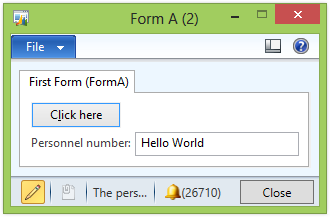 FormRun formRun;
;
args = new args();
// Our values which we want to pass to FormB
FormRun formRun;
;
args = new args();
// Our values which we want to pass to FormB
 // If we want pass just simple string we can use 'parm' method of 'Args' class
args.parm( AccountNum.text() );
// Run FormB
args.name( formstr( FormB ) );
formRun = classFactory.formRunClass( Args );
formRun.init();
formrun.run();
formrun.wait();
super();
}
Now override init() method in FormB.
public void init()
{
str anyStringValueFromCaller;
;
super();
// Check for passed arguments
if( element.args() )
{
// get string parameter
anyStringValueFromCaller = element.args().parm();
SelectedAccountNum.text(anyStringValueFromCaller);
}
}
// If we want pass just simple string we can use 'parm' method of 'Args' class
args.parm( AccountNum.text() );
// Run FormB
args.name( formstr( FormB ) );
formRun = classFactory.formRunClass( Args );
formRun.init();
formrun.run();
formrun.wait();
super();
}
Now override init() method in FormB.
public void init()
{
str anyStringValueFromCaller;
;
super();
// Check for passed arguments
if( element.args() )
{
// get string parameter
anyStringValueFromCaller = element.args().parm();
SelectedAccountNum.text(anyStringValueFromCaller);
}
}
 FormRun formRun;
 // If we want pass just simple string we can use 'parm' method of 'Args' class


